

Reference — lookup information.
What is Affinity Data?
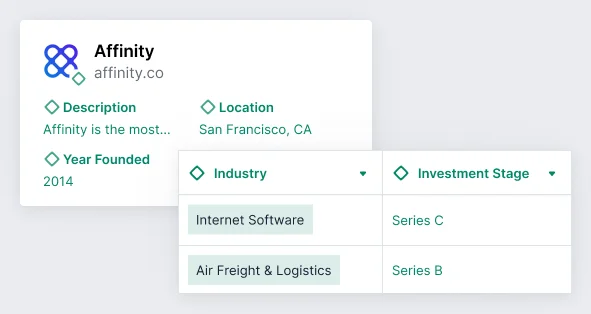
Affinity Data is Affinity’s proprietary datasets that can be leveraged to gain additional insights on people and organizations. As of January 2026, Affinity Data is visible on both org-relevant companies (in your network) and out-of-network companies (not yet in your network), allowing you to evaluate companies before adding them to your pipeline. Affinity Data fields are shown in the product with the green diamond icon and are exportable, accessible via the API, and usable for generating reports. Below is a breakdown of the categories Affinity Data provides datapoints for:- Affinity Data: Biographic - access primary information about the people in your network.
- 4 fields are available for all subscription tiers.
- 1 additional field is available for Advanced and Enterprise tiers only.
- Accessible on people lists and people’s profile pages.
- Affinity Data: Experience - work experience showing recent job changes about the people in your network.
- 3 fields are available for all subscription tiers.
- 7 additional fields are available for Advanced and Enterprise tiers only.
- Accessible on people lists and people’s profile pages.
- Affinity Data: Firmographic - access primary information about the organizations in your network.
- 7 fields are available for all subscription tiers.
- 1 additional field is available for Advanced and Enterprise tiers only.
- Accessible on organization lists, organization profile pages, and opportunity lists.
- Affinity Data: Funding - access fundraising information about the organizations in your network.
- 5 fields are available for all subscription tiers.
- Accessible on organization lists, organization profile pages, and opportunity lists.
- Affinity Data: Growth - identify high-growth organizations based on recent changes to employee headcount and leadership teams.
- 15 fields are available for Advanced and Enterprise tiers only.
- Accessible on organization lists, organization profile pages, and opportunity lists.
- See how some of these datapoints are used to generate Employee Growth Insights on organization profile pages.
List of all Affinity Data fields
Fields with one asterisk (*) are exclusive Affinity Data fields available to Advanced and Enterprise tiers only. Enriched fields: Connections, Date Added, First Email, First Meeting, Last Contact, Last Email, Last Meeting, Lists, Next Meeting, Source of Introduction, Time in Current Status, People, Organizations. Affinity Data: Biographic (people): Industry, Keywords*, LinkedIn URL, Location, Phone Number. Affinity Data: Experience (people): Current Job Title, Current Organization, Current Organization Headcount*, Current Job Functions*, Current Job Seniorities*, Current Job Start Date*, Education*, Job Titles, LinkedIn Profile Headline*, Years of Experience*. Affinity Data: Firmographic (organizations): Description, Industry, Location, Number of Employees, Year Founded, LinkedIn Profile (Founders/CEOs)*, LinkedIn URL, Linkedin Headcount. Affinity Data: Funding (organizations): Investment Stage, Investors, Last Funding Date, Last Funding Amount (USD), Total Funding Amount (USD). Affinity Data: Growth (organizations, all Advanced/Enterprise only): Employee Departures/Hires Last 3 Months, Employees (Current), Employees at various time intervals, MoM/QoQ/YoY Growth percentages.Are trials available for the exclusive Affinity Data fields? How do I purchase and access these fields?
Trials are not available for the exclusive Affinity Data fields. To learn more about these fields, please reach out to your Affinity representative or contact support@affinity.co.How often is Affinity Data updated?
- Affinity Data: Funding - Daily
- Affinity Data: Firmographic - Monthly
- Affinity Data: Growth - Monthly
- Affinity Data: Biographic - Biweekly
- Affinity Data: Experience - Biweekly
Why are some organizations enriched with Affinity Data fields, while others are not?
As of January 2026, Affinity Data appears on both org-relevant AND out-of-network company profiles. Organizations are enriched with Affinity Data if they exist in Affinity’s global database of companies. You don’t need to make a company org-relevant (add to your network) to see Affinity Data. Where Affinity Data appears: Out-of-network companies (not yet in your network):- Show Affinity Data fields on their profiles
- Visible when you search for and view the company
- Helps you assess fit before adding to your pipeline
- Cannot be added to Lists or edited until you make the company org-relevant
- Show Affinity Data fields on their profiles
- Appear in your Lists
- Can be edited, have Notes/Files, full interaction history
- Full CRM functionality available
Can I edit the Affinity Data field values?
- All field values are editable within the following sections: Affinity Data: Biographic, Firmographic, and Funding.
- All fields values are editable in the Affinity Data: Experience section, except for the Current Organization Headcount field. This field will be auto-filled based on the value within the Current Organization field for that person.
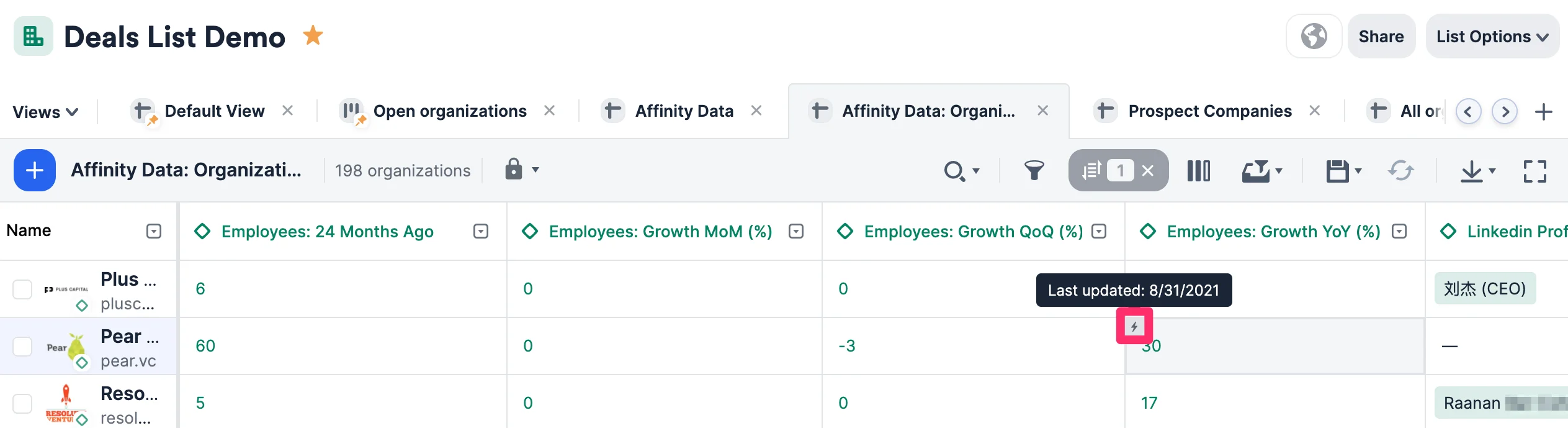
- Most field values are not editable within the following sections: Affinity Data: Growth. You can hover over the cell badge on the top-left corner of each cell to find out when it was last updated.
Can I set up notification alerts when field values change?
- For those who have access to Affinity Analytics, you can set up automatic notification alerts when certain conditions are met (see Affinity Analytics: Alerts).
- For those who don’t have access to Affinity Analytics, feel free to contact your Affinity representative or support@affinity.co for additional information.
- If you’re interested in setting up custom integrations instead at an additional cost, contact support@affinity.co and we’d be happy to connect you to our Solutions Team.
Important Callouts for the Affinity API/webhooks
- All fields within Affinity Data: Growth are read-only via the API - their field values cannot be edited.
- The Current Organization Headcount field within Affinity Data: Experience is read-only via the API - the field values under this field cannot be edited.
- Though you can make GET requests, you cannot make PUT/POST/DELETE requests.
- Currently, webhooks cannot be used to subscribe to automatic changes in field values. There will be no user-based changes since these specific field values are read-only.
Where can I access these fields?
Affinity Data fields will appear in the following areas:- Web App (saved views in lists and profile pages)
- Mobile App
- Affinity Analytics (dashboard views)
- Affinity API V1
- Affinity Pathfinder Chrome Extension (all Affinity Data fields)
- Affinity Outlook add-in (only specific Affinity Data fields)