

Concept — background and overview.
What are the different ways that contacts can be created?
- Created automatically via email/calendar syncing
- This will appear as, “This profile was automatically created by Affinity on
{date}.”
- This will appear as, “This profile was automatically created by Affinity on
- Created manually via the CRM, user invite, Pathfinder extension, Outlook add-in, or internal API call
- This will appear as, “This profile was automatically created by
{user}on{date}.”
- This will appear as, “This profile was automatically created by
- Created via Affinity Alliances (sending an Alliances invite)
- This will appear as, “This profile was created through Affinity Alliances on
{date}.”
- This will appear as, “This profile was created through Affinity Alliances on
- Created via data import or note import
- This will appear as, “This profile was imported by
{user}on{date}.”
- This will appear as, “This profile was imported by
- Created via the Affinity API (external API call or Affinity for Salesforce)
- This will appear as, “This profile was created by API on
{date}.” Note: There are a few scenarios that either fall outside of these categories or are considered undetermined. In this case, Affinity will not show one of the options above.
- This will appear as, “This profile was created by API on
Where can I find the creation sources in Affinity?
There are two different areas within the Affinity CRM where you can find a person’s creation source:- On a person’s profile page by clicking on the 3-dotted icon.
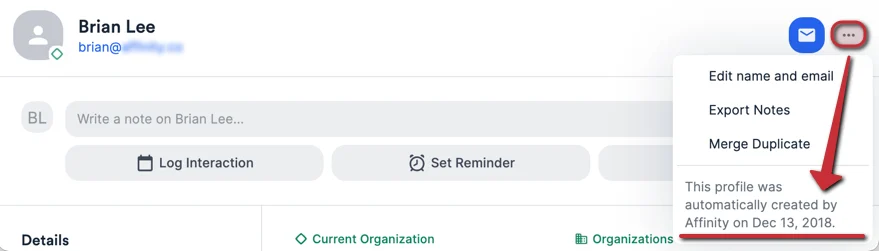
- You can click the Merge Duplicate option to also see the creation source of the duplicate you’re trying to merge.
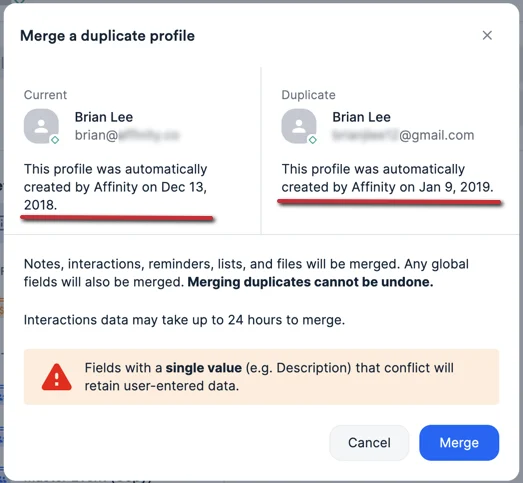
- Within the People tab of the Duplicate Management center found in Settings (for Admins and Enterprise Admins only).

Important Callouts
- The profile creation date and method is only available for people at this time. If you’d like to see this feature supported for organizations as well, we’d be happy to receive your feedback at support@affinity.co.