> ## Documentation Index
> Fetch the complete documentation index at: https://support.affinity.co/llms.txt
> Use this file to discover all available pages before exploring further.
# Rich text formatting for notes within Affinity
> Help center reference
**Reference** — lookup information.
Leverage rich text formatting for your notes in Affinity for better structure and readability.
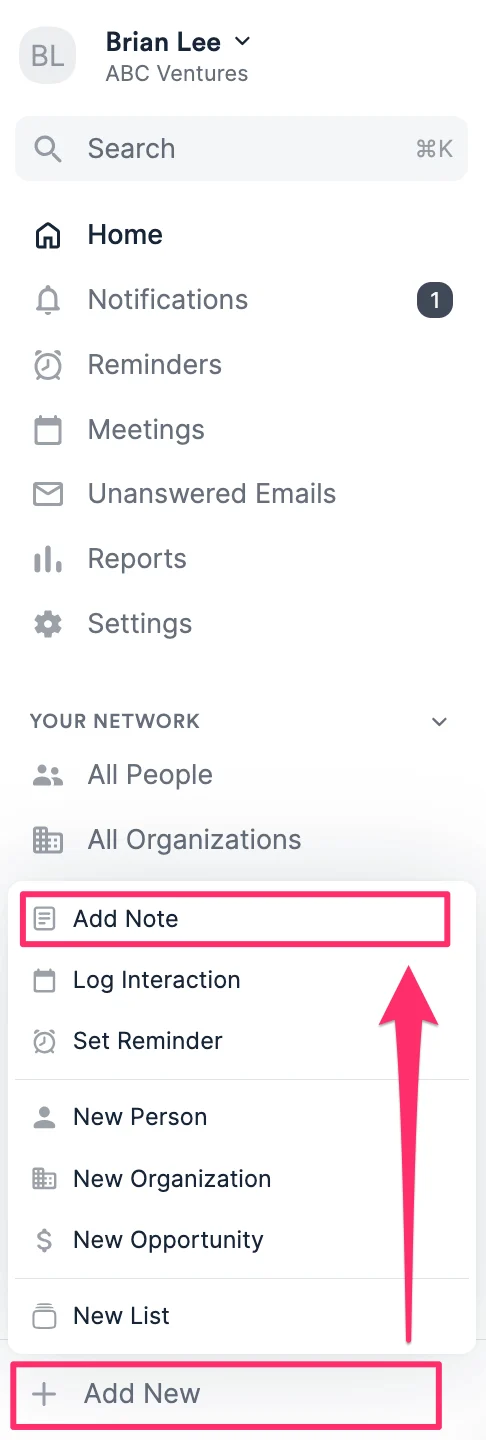
1. To begin, click **+ Add New** on the bottom-left corner of the global navigation, then click **Add Note**.
 2. Once you associate the note to a person, organization, or opportunity, you can move onto the different formatting options or immediately toggle them on with common keyboard shortcuts:
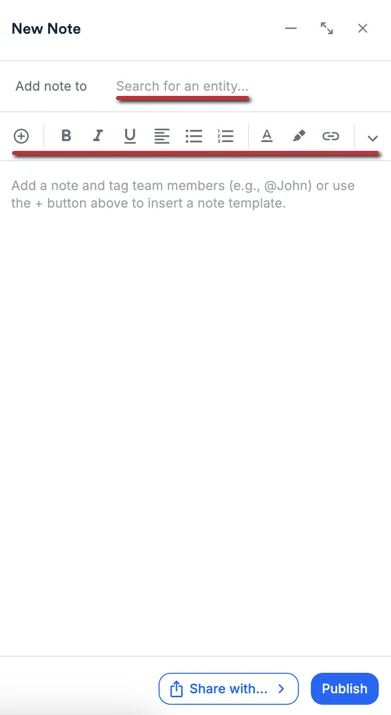 * **Bold**: Ctrl/Cmd + B
* *Italic*: Ctrl/Cmd + I
* Underline: Ctrl/Cmd + U
* Numbered list: # + . + `[space]`
* Blockquote: " + `[space]`
* Divider: - - - Typing a dash "-" and a space will automatically start bullet point formatting. Typing a "1." and a space will automatically start numbered formatting.
* **Bold**: Ctrl/Cmd + B
* *Italic*: Ctrl/Cmd + I
* Underline: Ctrl/Cmd + U
* Numbered list: # + . + `[space]`
* Blockquote: " + `[space]`
* Divider: - - - Typing a dash "-" and a space will automatically start bullet point formatting. Typing a "1." and a space will automatically start numbered formatting.
 3. Create hyperlinks by highlighting a word/phrase, then by clicking the **Hyperlink** icon - you'll notice a popup appear where you can add a link.
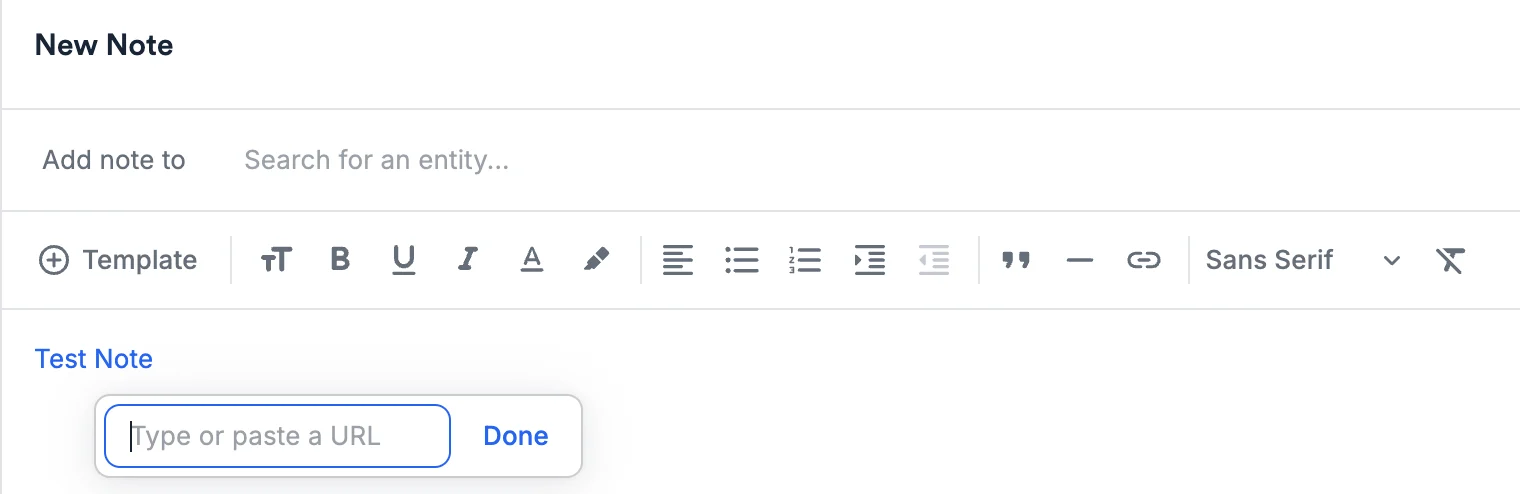 * You can also create **hyperlinks** by simply highlighting the text, and **pasting** (CMD + V / CTRL + V) the URL directly.
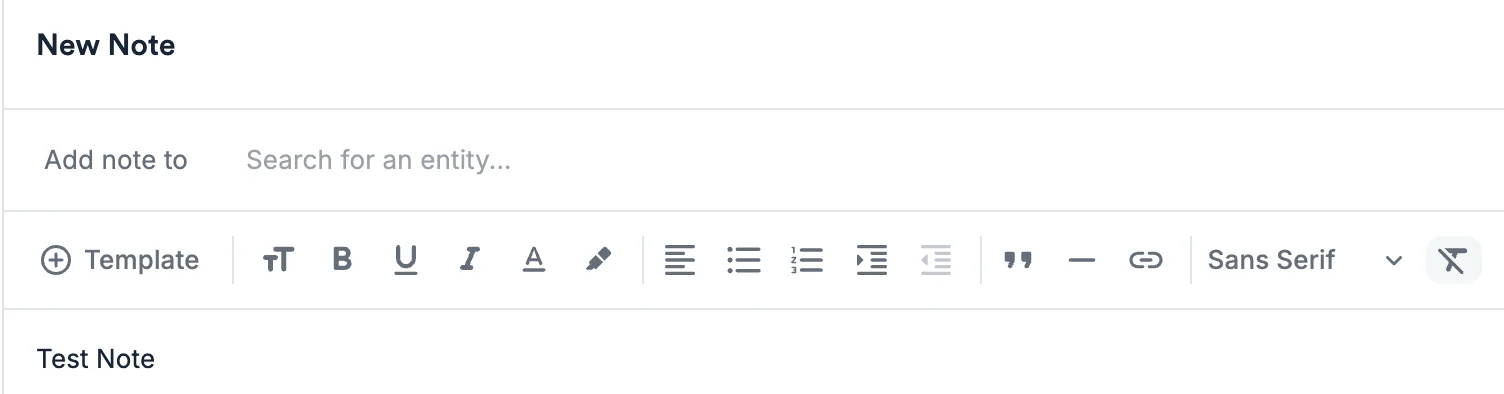
4. Want to remove the formatting for some text? Simply highlight the word/phrase, then click the **Clear format** icon (the letter T with a line across).
* You can also create **hyperlinks** by simply highlighting the text, and **pasting** (CMD + V / CTRL + V) the URL directly.
4. Want to remove the formatting for some text? Simply highlight the word/phrase, then click the **Clear format** icon (the letter T with a line across).
 5. Create [Note Templates](/s/article/How-to-create-use-Note-Templates-within-Affinity) to quickly use for future note-taking.
* You can also @ mention your team members in notes to notify them about that particular note.
## Limitations
* Copying/pasting nested bullets between Microsoft Word/other apps and Affinity is not supported.
* Affinity Mobile App: You can view and save notes, but only in plain text. If you try to view a note that contains rich text, it will display in \*\*plain text\*\* (Markdown).
## Related topics
- [Tutorial 4: Notes and Research Workflows](/s/article/Tutorial-4-notes-and-research-workflows.md)
- [How to add and view notes in Affinity](/s/article/How-to-add-and-view-notes-in-Affinity.md)
- [Notes Center Reference](/s/article/Notes-center-reference.md)
- [How To Set Up Your Email Signature In Affinity](/s/article/How-to-set-up-your-email-signature-in-Affinity.md)
- [How To Create Use Email Templates Within Affinity](/s/article/How-to-create-use-Email-Templates-within-Affinity.md)
5. Create [Note Templates](/s/article/How-to-create-use-Note-Templates-within-Affinity) to quickly use for future note-taking.
* You can also @ mention your team members in notes to notify them about that particular note.
## Limitations
* Copying/pasting nested bullets between Microsoft Word/other apps and Affinity is not supported.
* Affinity Mobile App: You can view and save notes, but only in plain text. If you try to view a note that contains rich text, it will display in \*\*plain text\*\* (Markdown).
## Related topics
- [Tutorial 4: Notes and Research Workflows](/s/article/Tutorial-4-notes-and-research-workflows.md)
- [How to add and view notes in Affinity](/s/article/How-to-add-and-view-notes-in-Affinity.md)
- [Notes Center Reference](/s/article/Notes-center-reference.md)
- [How To Set Up Your Email Signature In Affinity](/s/article/How-to-set-up-your-email-signature-in-Affinity.md)
- [How To Create Use Email Templates Within Affinity](/s/article/How-to-create-use-Email-Templates-within-Affinity.md)