> ## Documentation Index
> Fetch the complete documentation index at: https://support.affinity.co/llms.txt
> Use this file to discover all available pages before exploring further.
# How To Sign Into Affinity
> Help center reference: How To Sign Into Affinity
**How-to** — task-oriented recipe.
Welcome to Affinity! In this article, we'll go over how to make sure you sign in correctly as a **user** or as a **collaborator**:
* **Users** have full read-and-edit access to the Affinity account, including [Directories](/s/article/All-people-and-all-organizations), [List](/s/article/Lists), [Profiles](/s/article/Navigating-profile-pages-in-Affinity), etc.
* **Collaborators** only have read-only access to [specific sheet views](/s/article/How-to-create-and-use-saved-views-in-new-lists) within Affinity lists.
* Team members **cannot** be invited as Collaborators, they must be invited as Users.
## Signing into Affinity for the first time
## Option 1: Signing in as a User
If you're signing into Affinity for the first time as a **user**, please follow these steps:
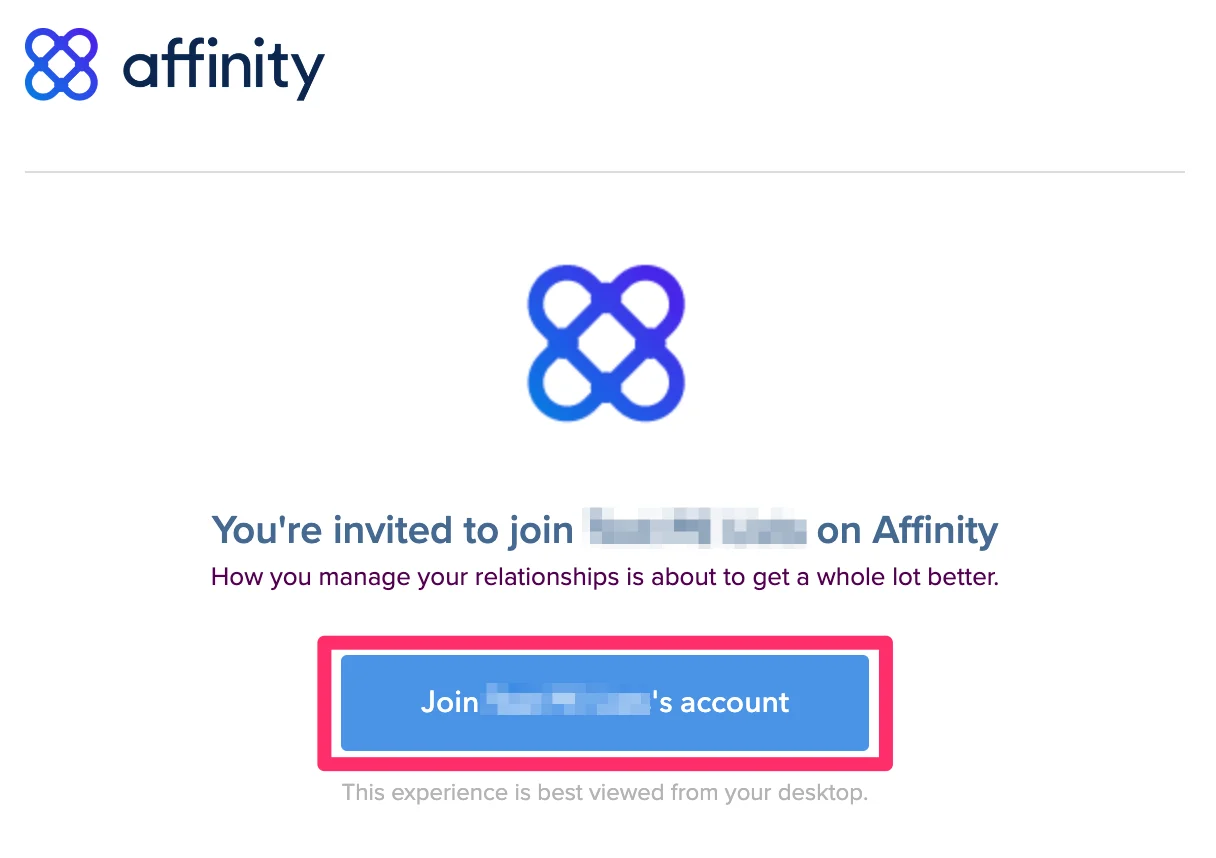
1. Click on the email invite that was sent to you, then click the **Join \_\_\_\_\_'s account** button.
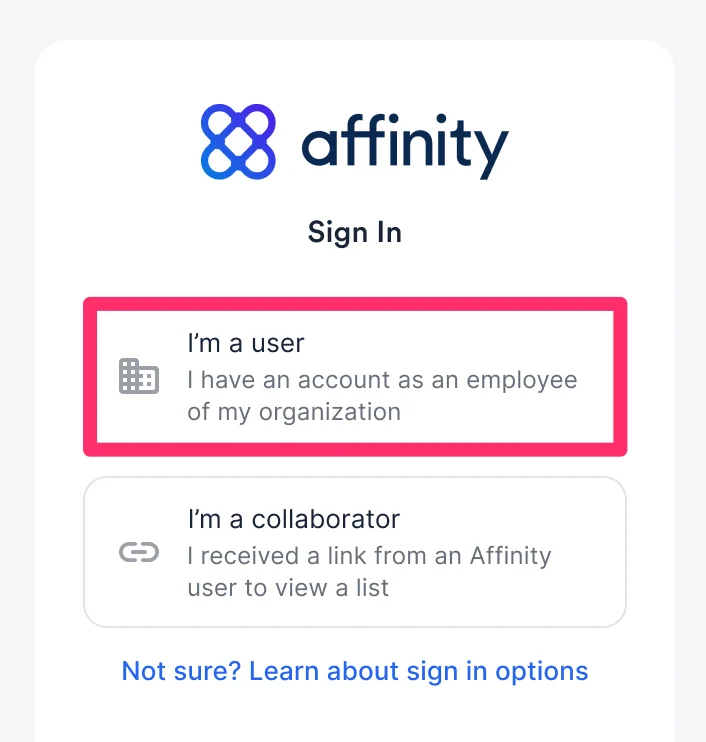
 2. Then, click **I am a user**.
 3. Depending on which email provider your email account is based off of, select one of the articles below:
1. [How to sign in with Google](/s/article/How-to-sign-in-with-Google)
2. [How to sign in with Microsoft Office 365](/s/article/How-to-sign-in-with-Microsoft-Office-365)
3. [How to sign in with Microsoft Exchange (On-Premise)](/s/article/How-to-sign-in-with-Microsoft-Exchange-On-Premise)
1. [How to find your custom EWS URL](/s/article/How-to-find-your-custom-EWS-URL)
2. [Troubleshooting sign in for Microsoft Exchange (On-Premise)](/s/article/Troubleshooting-sign-in-for-Microsoft-Exchange-On-Premise)
4. [How to set up Custom Single Sign-On (SSO) with Affinity](/s/article/How-to-set-up-Custom-Single-Sign-On-SSO-with-Affinity)
1. [How to set up Okta (SAML) for Affinity access](/s/article/How-to-set-up-Okta-SAML-for-Affinity-access)
2. [How to set up Azure (SAML) for Affinity access](/s/article/How-to-set-up-Azure-SAML-for-Affinity-access)
4. Please note that you can only sign into Affinity if your email provider is Gmail or Microsoft (i.e. Office 365, Hotmail, Live, etc.). You **cannot** sign into Affinity if your email account is from Yahoo, AOL, or any other email provider.
## Option 2: Signing in as a Collaborator
If you're signing into Affinity for the first time as a **collaborator**, please follow these steps:
1. Click on the email invite that was sent to you by the Affinity user, then click **Join Affinity**.
2. Then, click **I am a collaborator**.
3. If the Affinity user's company does **not** require you to sign in via SSO, then you can simply enter your email and click **Send Email**.
3. Depending on which email provider your email account is based off of, select one of the articles below:
1. [How to sign in with Google](/s/article/How-to-sign-in-with-Google)
2. [How to sign in with Microsoft Office 365](/s/article/How-to-sign-in-with-Microsoft-Office-365)
3. [How to sign in with Microsoft Exchange (On-Premise)](/s/article/How-to-sign-in-with-Microsoft-Exchange-On-Premise)
1. [How to find your custom EWS URL](/s/article/How-to-find-your-custom-EWS-URL)
2. [Troubleshooting sign in for Microsoft Exchange (On-Premise)](/s/article/Troubleshooting-sign-in-for-Microsoft-Exchange-On-Premise)
4. [How to set up Custom Single Sign-On (SSO) with Affinity](/s/article/How-to-set-up-Custom-Single-Sign-On-SSO-with-Affinity)
1. [How to set up Okta (SAML) for Affinity access](/s/article/How-to-set-up-Okta-SAML-for-Affinity-access)
2. [How to set up Azure (SAML) for Affinity access](/s/article/How-to-set-up-Azure-SAML-for-Affinity-access)
4. Please note that you can only sign into Affinity if your email provider is Gmail or Microsoft (i.e. Office 365, Hotmail, Live, etc.). You **cannot** sign into Affinity if your email account is from Yahoo, AOL, or any other email provider.
## Option 2: Signing in as a Collaborator
If you're signing into Affinity for the first time as a **collaborator**, please follow these steps:
1. Click on the email invite that was sent to you by the Affinity user, then click **Join Affinity**.
2. Then, click **I am a collaborator**.
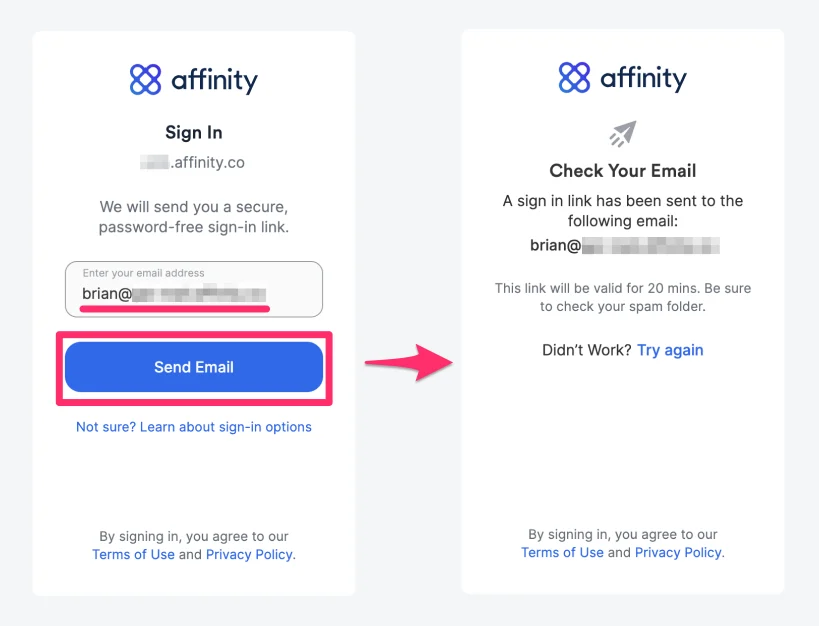
3. If the Affinity user's company does **not** require you to sign in via SSO, then you can simply enter your email and click **Send Email**.
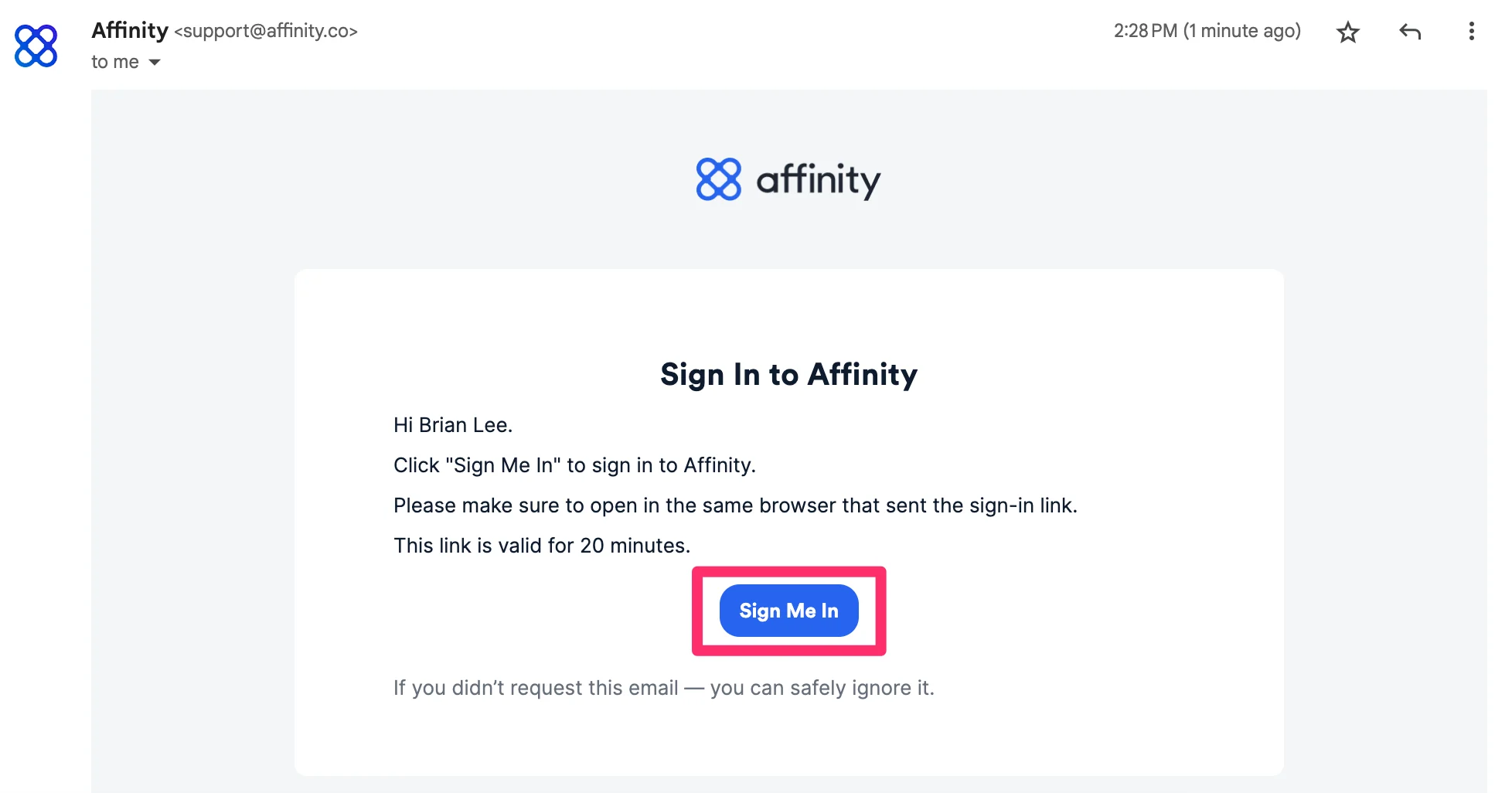
 1. You will receive an email that contains the unique **Sign Me In** button that will verify your email address and sign you in as a collaborator.
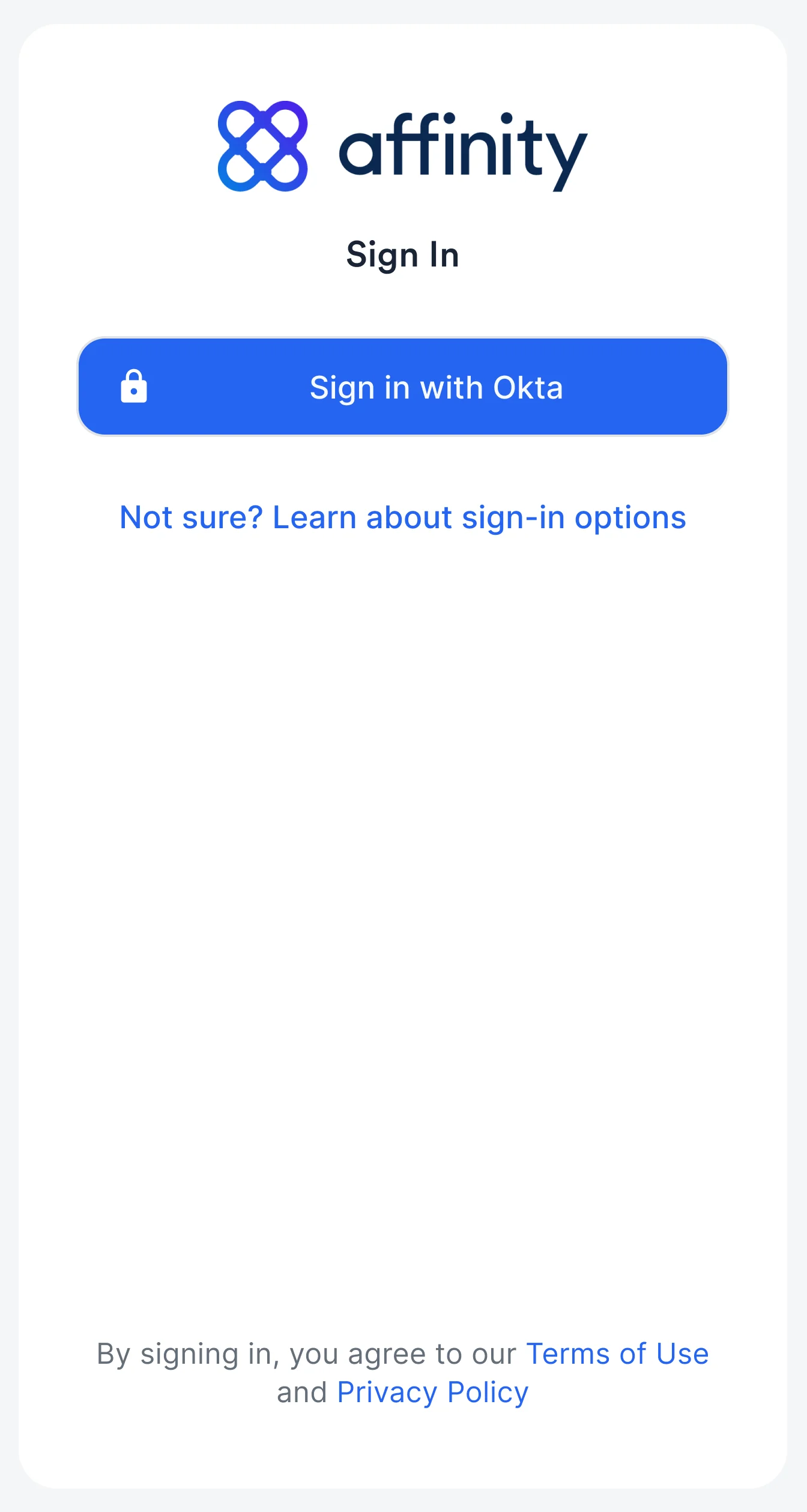
 4. If the Affinity user's company requires you to also sign in via SSO, please make sure they add you to their SSO provider's list. Once doing so, you will notice a different sign in option (e.g. **Sign in with OKTA**).
 ## Signing into Affinity moving forward
1. To sign into Affinity moving forward as a **user** or a **collaborator**, we highly suggest saving your unique Affinity subdomain as a bookmark on your web browser - it should be in the following format: `[subdomain].affinity.co`
2. If you're not sure what your Affinity subdomain is, please check out [How to find your Affinity subdomain](/s/article/How-to-find-your-Affinity-subdomain).
## Important Callouts
* You can only sign in and sync into Affinity if your email provider is Gmail or Microsoft (i.e. Office 365, microsoft.com, Hotmail, Live, etc.).
* **For Microsoft 365 Government Community Cloud (GCC) users**
* Affinity supports Microsoft accounts that are GCC-based and use these domains: [https://portal.azure.com](https://portal.azure.com/) and [https://graph.microsoft.com](https://graph.microsoft.com/).
* Affinity does **not** support Microsoft accounts that are GCC-based but use these domains: [https://portal.azure.us](https://portal.azure.us/) and [https://graph.microsoft.us](https://graph.microsoft.us/).
* You **cannot** sign into Affinity if your email account is from Yahoo, AOL, or any other email provider.
* Only **Enterprise** tier customers can [setup Custom Single Sign-On (SSO) with Affinity](/s/article/How-to-set-up-Custom-Single-Sign-On-SSO-with-Affinity). Here are two common SSO providers and how to set them up for Affinity access:
* [How to set up Okta (SAML) for Affinity access](/s/article/How-to-set-up-Okta-SAML-for-Affinity-access)
* [How to set up Azure (SAML) for Affinity access](/s/article/How-to-set-up-Azure-SAML-for-Affinity-access)
## Related topics
- [How to sign in with Google](/s/article/How-to-sign-in-with-Google.md)
- [How To Sign In With Microsoft Exchange On Premise](/s/article/How-to-sign-in-with-Microsoft-Exchange-On-Premise.md)
- [How To Sign In With Microsoft Office 365](/s/article/How-to-sign-in-with-Microsoft-Office-365.md)
- [How To Set Up Custom Single Sign On SSO With Affinity](/s/article/How-to-set-up-Custom-Single-Sign-On-SSO-with-Affinity.md)
- [Can You Sign Into Affinity With A Custom Password](/s/article/Can-you-sign-into-Affinity-with-a-custom-password.md)
## Signing into Affinity moving forward
1. To sign into Affinity moving forward as a **user** or a **collaborator**, we highly suggest saving your unique Affinity subdomain as a bookmark on your web browser - it should be in the following format: `[subdomain].affinity.co`
2. If you're not sure what your Affinity subdomain is, please check out [How to find your Affinity subdomain](/s/article/How-to-find-your-Affinity-subdomain).
## Important Callouts
* You can only sign in and sync into Affinity if your email provider is Gmail or Microsoft (i.e. Office 365, microsoft.com, Hotmail, Live, etc.).
* **For Microsoft 365 Government Community Cloud (GCC) users**
* Affinity supports Microsoft accounts that are GCC-based and use these domains: [https://portal.azure.com](https://portal.azure.com/) and [https://graph.microsoft.com](https://graph.microsoft.com/).
* Affinity does **not** support Microsoft accounts that are GCC-based but use these domains: [https://portal.azure.us](https://portal.azure.us/) and [https://graph.microsoft.us](https://graph.microsoft.us/).
* You **cannot** sign into Affinity if your email account is from Yahoo, AOL, or any other email provider.
* Only **Enterprise** tier customers can [setup Custom Single Sign-On (SSO) with Affinity](/s/article/How-to-set-up-Custom-Single-Sign-On-SSO-with-Affinity). Here are two common SSO providers and how to set them up for Affinity access:
* [How to set up Okta (SAML) for Affinity access](/s/article/How-to-set-up-Okta-SAML-for-Affinity-access)
* [How to set up Azure (SAML) for Affinity access](/s/article/How-to-set-up-Azure-SAML-for-Affinity-access)
## Related topics
- [How to sign in with Google](/s/article/How-to-sign-in-with-Google.md)
- [How To Sign In With Microsoft Exchange On Premise](/s/article/How-to-sign-in-with-Microsoft-Exchange-On-Premise.md)
- [How To Sign In With Microsoft Office 365](/s/article/How-to-sign-in-with-Microsoft-Office-365.md)
- [How To Set Up Custom Single Sign On SSO With Affinity](/s/article/How-to-set-up-Custom-Single-Sign-On-SSO-with-Affinity.md)
- [Can You Sign Into Affinity With A Custom Password](/s/article/Can-you-sign-into-Affinity-with-a-custom-password.md)