> ## Documentation Index
> Fetch the complete documentation index at: https://support.affinity.co/llms.txt
> Use this file to discover all available pages before exploring further.
# How to filter by empty cells
> Help center reference
**How-to** — task-oriented recipe.
Filter by empty cells within a list to quickly see which cells you want to fill out if needed. Please note that this feature does not apply to the following default fields provided by Affinity:
* People
* Connections
* Date Added
* Time in Current Status
## **How to filter by empty cells**
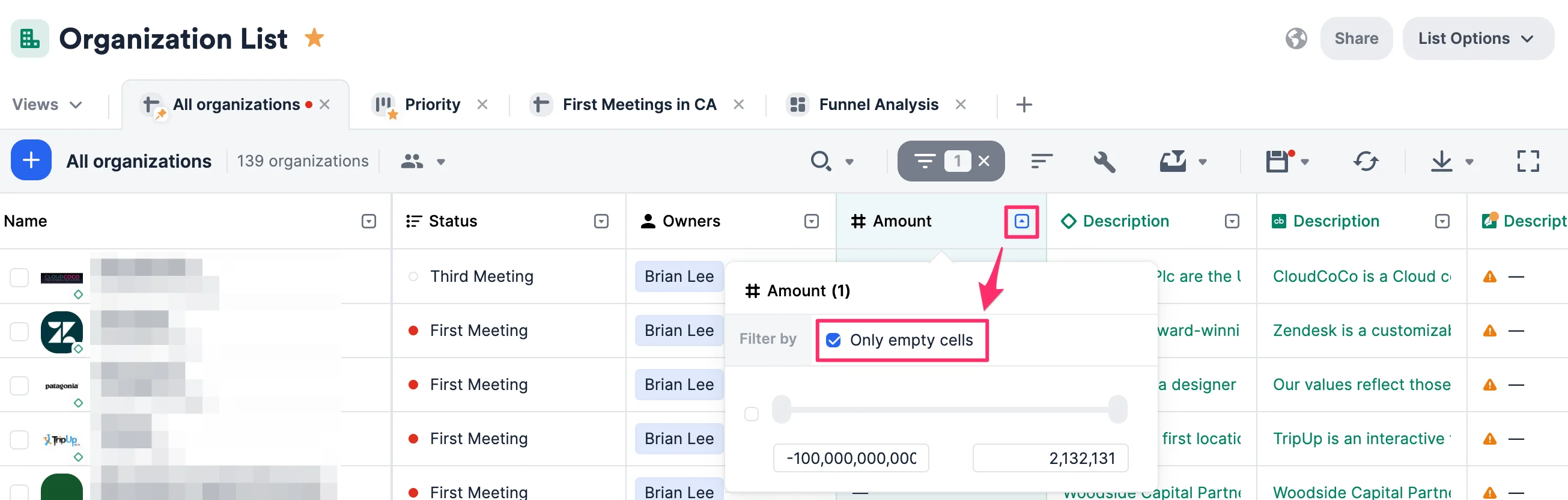
1. Click the dropdown arrow next to the column header.
2. Click **Filter by \_\_\_\_\_\_\_\_**.
3. Check the box next to **Only empty cells**. Check the box next to **Only empty cells**.
 ## Related topics
- [Filter/Sort/Operators Reference](/s/article/Filter-sort-operators-reference.md)
- [How to filter/sort columns within a list](/s/article/How-to-filter-sort-columns-within-a-list.md)
- [Tutorial 7: Master List Views — Sort, Filter, Favorite, and Share](/s/article/Tutorial-7-master-list-views-sort-filter-favorite-and-share.md)
- [Tutorial 1: Your First List — Create, Populate, and Organize](/s/article/Tutorial-1-your-first-list-create-populate-and-organize.md)
- [Lists in Affinity — Open Beta Guide](/s/article/Lists-in-Affinity.md)
## Related topics
- [Filter/Sort/Operators Reference](/s/article/Filter-sort-operators-reference.md)
- [How to filter/sort columns within a list](/s/article/How-to-filter-sort-columns-within-a-list.md)
- [Tutorial 7: Master List Views — Sort, Filter, Favorite, and Share](/s/article/Tutorial-7-master-list-views-sort-filter-favorite-and-share.md)
- [Tutorial 1: Your First List — Create, Populate, and Organize](/s/article/Tutorial-1-your-first-list-create-populate-and-organize.md)
- [Lists in Affinity — Open Beta Guide](/s/article/Lists-in-Affinity.md)